はじめに
自分もまだ正月いけます! nikkieです。
注目されているbrowser-use。
リポジトリのREADMEにあるQuick startをGeminiを指定して動かしました。
https://github.com/browser-use/browser-use/tree/0.1.17?tab=readme-ov-file#quick-start
目次
報告されているエラー
OpenAIのGPTでは動きますが、Geminiに変えるとエラーが報告されています
-from langchain_openai import ChatOpenAI
+from langchain_google_genai import ChatGoogleGenerativeAI
from browser_use import Agent
import asyncio

async def main():
    agent = Agent(
        task="Find a one-way flight from Bali to Oman on 12 January 2025 on Google Flights. Return me the cheapest option.",
-        llm=ChatOpenAI(model="gpt-4o"),
+        llm=ChatGoogleGenerativeAI(model="gemini-2.0-flash-exp"),
    )
    result = await agent.run()
    print(result)

asyncio.run(main())
INFO     [agent] 🚀 Starting task: Find a one-way flight from Bali to Oman on 12 January 2025 on Google Flights. Return me the cheapest option.
INFO     [agent]
📍 Step 1
ERROR    [agent] ❌ Result failed 1/5 times:
 Invalid argument provided to Gemini: 400 * GenerateContentRequest.tools[0].function_declarations[0].parameters.properties[action].items.properties[input_text].properties: should be non-empty for OBJECT type
* GenerateContentRequest.tools[0].function_declarations[0].parameters.properties[action].items.properties[extract_content].properties: should be non-empty for OBJECT type
* GenerateContentRequest.tools[0].function_declarations[0].parameters.properties[action].items.properties[scroll_down].properties: should be non-empty for OBJECT type
* GenerateContentRequest.tools[0].function_declarations[0].parameters.properties[action].items.properties[scroll_to_text].properties: should be non-empty for OBJECT type
* GenerateContentRequest.tools[0].function_declarations[0].parameters.properties[action].items.properties[go_to_url].properties: should be non-empty for OBJECT type
* GenerateContentRequest.tools[0].function_declarations[0].parameters.properties[action].items.properties[send_keys].properties: should be non-empty for OBJECT type
* GenerateContentRequest.tools[0].function_declarations[0].parameters.properties[action].items.properties[get_dropdown_options].properties: should be non-empty for OBJECT type
* GenerateContentRequest.tools[0].function_declarations[0].parameters.properties[action].items.properties[scroll_up].properties: should be non-empty for OBJECT type
* GenerateContentRequest.tools[0].function_declarations[0].parameters.properties[action].items.properties[open_tab].properties: should be non-empty for OBJECT type
* GenerateContentRequest.tools[0].function_declarations[0].parameters.properties[action].items.properties[go_back].properties: should be non-empty for OBJECT type
* GenerateContentRequest.tools[0].function_declarations[0].parameters.properties[action].items.properties[done].properties: should be non-empty for OBJECT type
* GenerateContentRequest.tools[0].function_declarations[0].parameters.properties[action].items.properties[select_dropdown_option].properties: should be non-empty for OBJECT type
* GenerateContentRequest.tools[0].function_declarations[0].parameters.properties[action].items.properties[click_element].properties: should be non-empty for OBJECT type
* GenerateContentRequest.tools[0].function_declarations[0].parameters.properties[action].items.properties[switch_tab].properties: should be non-empty for OBJECT type
* GenerateContentRequest.tools[0].function_declarations[0].parameters.properties[action].items.properties[search_google].properties: should be non-empty for OBJECT type
同様の報告
- Error when using Gemini API. · Issue #7 · browser-use/browser-use · GitHub
- Can we have this intergrated with Gemini API ? If Yes has anyone achieved it ? · browser-use browser-use · Discussion #155 · GitHub
対処法
Issue #104 (上で埋め込んだもの)によるとlangchain-google-genaiの問題のようです。
- PyPIの最新(2.0.7)は修正マージ前
つまり、記事執筆時点(2025/01/05時点)では、langchain-google-genaiをリポジトリからインストールすればbrowser-useをGeminiで動かせます。
これはlangchain-google-genaiの2.0.8以降がリリースされるまでのworkaroundとなります。
browser-use、Geminiで動かないって報告あがってますが
— nikkie(にっきー) / にっP (@ftnext) 2025年1月4日
langchain-google-genaiのバグ修正版をリポジトリからインストールで動きました
ref: https://t.co/IkTQIEzAQw
pip install "langchain-google-genai @ git+ssh://git@github.com/langchain-ai/langchain-google.git#subdirectory=libs/genai"
browser-use「Quick start」をGeminiで動かす
- Python 3.11.8
pip install browser-use "langchain-google-genai @ git+ssh://git@github.com/langchain-ai/langchain-google.git#subdirectory=libs/genai"playwright install- これが必要と認識したので仮想環境を使ったのですが、記事執筆の中で
uvx playwright installをまずやって、inline script metadataでいいのではと気づきました)
- これが必要と認識したので仮想環境を使ったのですが、記事執筆の中で
- 環境変数
GOOGLE_API_KEY
stepの途中でエラーにならなかった試行
(デンパサル -> オマーン 片道なので、合ってないのではと思っています)
INFO [agent] 📄 Result: The cheapest one-way flight from Bali to Oman on 12 January 2025 is to Muscat for 63,770 JPY.
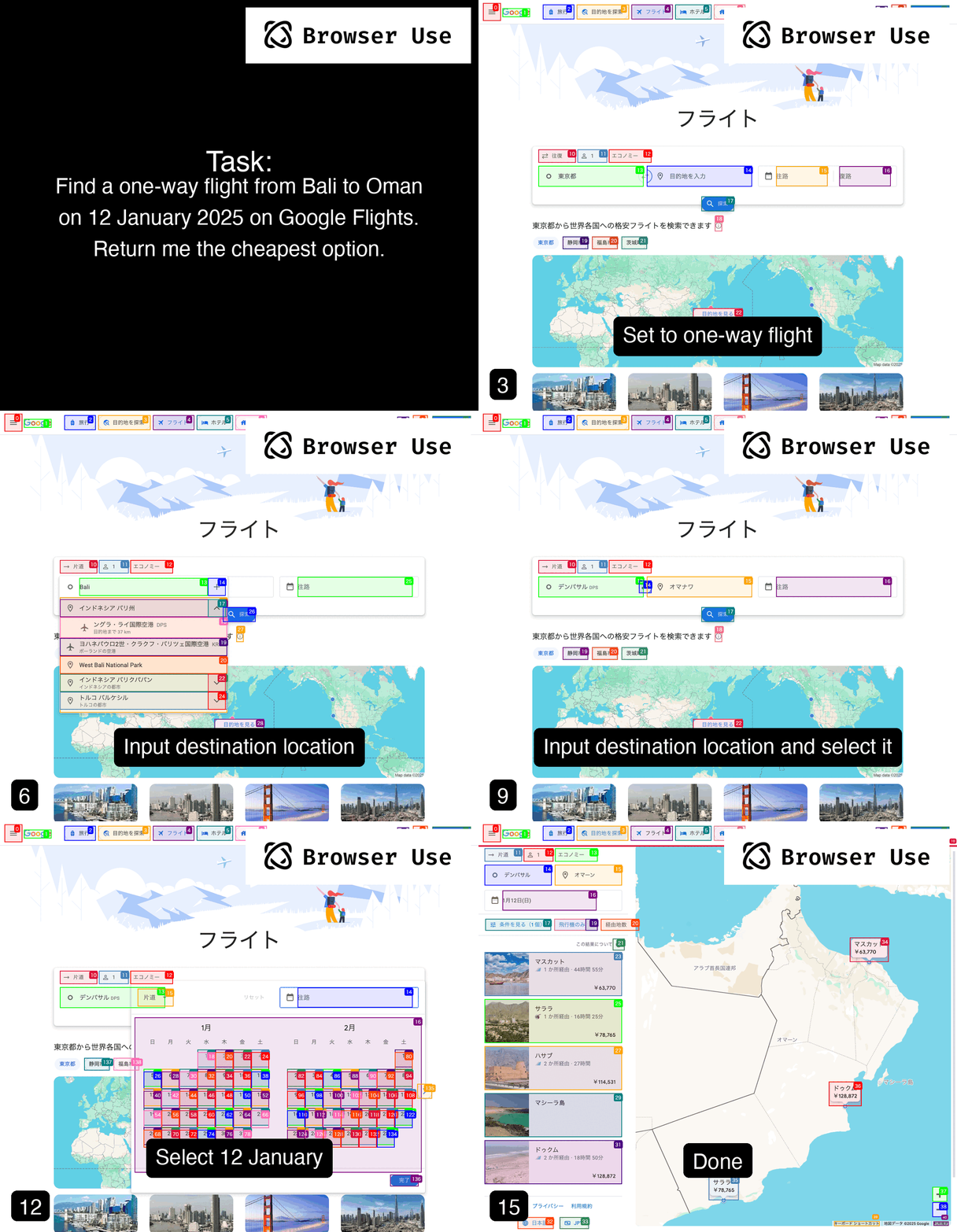
browser-use自体私はまだ理解が追いついていないのですが、存外失敗するなという感想です。
日本語なのが関係しているんでしょうか?
余談:なぜOpenAIではないのか
微課金したのですが、現在Usage tier 1らしく、APIキー1が有効にならないみたいなんですよね(なんか最近変わりましたかね?)
https://platform.openai.com/settings/organization/limits
https://platform.openai.com/docs/guides/rate-limits#usage-tiers
Tier 2
$50 paid and 7+ days since first successful payment
現在は429が返ってきます
https://help.openai.com/en/articles/6891839-api-error-codes
終わりに
OpenAIのGPTの代わりにGeminiでbrowser-useをひとまず動かせました。
langchain-google-genai 2.0.7以前の問題でエラーが出ていましたが、リポジトリ上で修正はされています。
同様のIssueをいくつか見かけており、私も同様に動かせないかと思いましたが、対処いただいたことに感謝します。
もう少し戯れてみたいな〜
